
If English is not your first language, you probably know this feeling.
You know exactly what you want to say. You just do not know how it will sound.
I have lived with that feeling since 2015, when I started working remotely.
A Team Without a Shared First Language
Today, I work in support at RebelCode. Our team is spread across multiple countries. For many of us, English is a second language.
Most of our work happens in writing. Threads, comments, replies. There is no tone of voice to soften a sentence, and no face to show that you meant well.
So a reply that sounds slightly off can easily be read the wrong way. Too short can sound rude. Too careful can sound unsure.
Once, I sent a teammate a short request. To me, it was clear. To them, it was not. I had to apologize for the shorthand and explain what I meant in full.
It was a small thing. But it reminded me how much depends on a few words.
The Old Routine
For years, I had a routine.
Write a draft. Copy it into a translator, a grammar checker, or an AI chat. Fix it. Paste it back. Read it again. Then, finally, send.
It worked. But it was slow, and it was tiring.
And there was a bigger problem. The tool only saw my message, not the conversation around it. It did not know what was asked, who said what, or what had already been decided.
It could fix my grammar. It could not tell me whether my reply fit the conversation.
The Reading Side
People usually talk about writing. But reading in a second language takes energy too.
Picture a long discussion with many replies, different opinions, and a few decisions buried in the middle. In your first language, you skim it. In your second language, you read it carefully, sometimes twice, to make sure you did not miss anything.
That is a lot of energy before you even start writing.
How I Use AI to Reply to My Team
Today, my routine looks different.
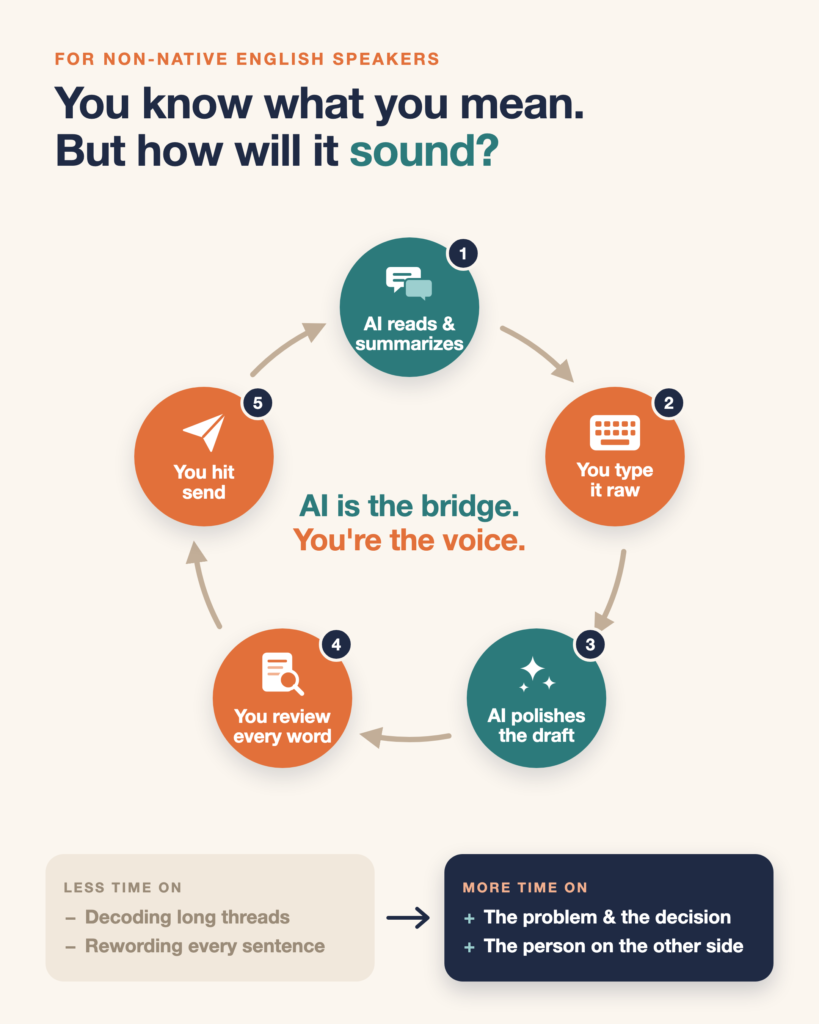
Our team talks on Twist, so I connected it to Claude Code through MCP, a standard way to connect AI to the tools you already use. Now I just point it to the thread I am replying to. It reads the whole conversation. No copying. No screenshots. It already knows the context.
Often, I ask for a summary first. What was decided. What is still open. What is being asked of me.
Then I type what I mean, raw. Something like:
“docs updated pls check tmrw”
It comes back with:
“The docs are updated. Could you take a look tomorrow?”
A small change. But that is the point. It does not add ideas. It helps the ones I already have land the way I mean them.
I Still Read Every Word
Then I read the draft. Word by word.
Sometimes I change a phrase that does not sound like me. Sometimes I fix a detail it got wrong. Then I hit send. Never the AI.
That part matters to me for two reasons.
First, my name is on every message. If something is wrong, it is my mistake, not the AI’s.
Second, reading every draft carefully is how I keep learning. I see how a rough thought becomes a clear sentence.
A Note on Privacy
If you try this, be careful about what you share.
I only point the AI to the thread I am replying to. I keep passwords, customer data, and anything confidential out of it. And if you use this at work, check what your company allows first.
Where My Energy Goes Now
The biggest change is not better grammar.
It is where my energy goes.
Less time decoding long threads. Less time going back and forth over how a sentence sounds.
More time on what actually matters. The problem. The decision. The person on the other side.
A Bridge, Not a Replacement
AI did not replace my voice.
It became a bridge between what I mean and how it lands.
